Why Technical SEO Is the Foundation of a High-Performance Website
When I started working with small business websites, I used to focus almost entirely on content and backlinks. I assumed that if the writing was strong and the links were there, the search traffic would follow. After a few hard lessons with sites that had great content but terrible crawlability, I changed my approach. The truth is that no amount of well-written copy can compensate for a site that Googlebot cannot navigate properly. That is where technical SEO becomes the real differentiator.
Technical SEO is not a separate discipline you hand off to a developer and forget about. It is the structural integrity of everything else you do online. If your pages take too long to load, if your internal links create redirect chains, or if your XML sitemaps point to broken URLs, then your best content might never see the inside of a search result page. I have seen sites lose half their organic traffic simply because a robots.txt file accidentally blocked the wrong directory. Those mistakes happen more often than people realize.
Start With Crawlability and Indexing
Before you can rank for anything, search engines have to find your pages and decide which ones to store in their index. That process begins with crawl budget, the limited number of URLs Googlebot will crawl on your site during each visit. If you have thousands of thin pages, duplicate content, or infinite calendar archives, the crawler wastes time on those instead of your important product or service pages.
One of the first things I check in Google Search Console is the coverage report. It shows which pages are indexed, which are excluded, and why. I have found cases where canonical tags were pointing to the wrong URL, causing the search engine to treat the correct page as a duplicate. Fixing those canonical tags alone restored rankings within a week. Similarly, a properly maintained robots.txt file tells the crawler where it is welcome and where it should stay out. Blocking your admin panel or staging environment is smart. Blocking your blog archive by mistake is a disaster.
XML sitemaps are another early win. Many website platforms generate them automatically, but they often include outdated URLs or ignore new pages. I upload a fresh sitemap to Google Search Console after every major update and check that it contains only the pages I want indexed. I also use the URL Inspection tool there to request indexing for new content. These steps sound basic, but they are the ones most site owners skip.
Speed, Rendering, and Core Web Vitals
Page speed has been a ranking factor for a long time, but Google's shift to mobile-first indexing made it even more critical. The days of designing a desktop site and then squeezing it into a mobile view are over. Googlebot now crawls and evaluates the mobile version of your site first. If that version loads slowly or has rendering issues, your rankings suffer regardless of how fast the desktop version is.
I run every site through PageSpeed Insights and pay close attention to the core web vitals: Largest Contentful Paint, First Input Delay, and Cumulative Layout Shift. These metrics measure how quickly the main content loads, how responsive the page is, and whether elements shift around during loading. A common culprit I see is unoptimized images and third-party scripts. One analytics script that loads slowly can delay the entire page. I also watch out for JavaScript SEO problems. If your site relies heavily on JavaScript to load content, and that script blocks rendering, Googlebot may not see your text at all. Pre-rendering or using server-side rendering can solve this without sacrificing interactivity.
AMP used to be a separate path for fast mobile pages, but Google has moved away from requiring it. These days you can achieve similar speed improvements with good caching, image compression, and a lightweight theme. The goal is to deliver a fast experience without maintaining a separate codebase.
Structured Data and Schema Markup
One of the most underused technical levers is schema markup. Adding structured data to your pages helps search engines understand what your content means, not just what it says. For example, if you run a local business, LocalBusiness schema can make your address and phone number appear in rich results. If you publish articles, Article or NewsArticle schema can get your headline and publish date highlighted.
I always validate my markup using Google's structured data testing tool before pushing it live. It catches syntax errors and missing required fields. Once the markup is correct, I monitor the enhancements report in Google Search Console to see which rich results are being served. If a page has schema for a recipe but the review stars are missing, the tool will tell you why.
Schema markup also plays a role in mobile-first indexing. Googlebot can parse structured data more reliably than free-form text, which means correctly marked-up pages may be indexed more accurately. It is not a direct ranking factor, but it improves how your content is displayed, which can increase click-through rates.
Internal Linking and URL Structure
Technical SEO is not just about how search engines interact with your site. It also affects how users and crawlers move through your content. A clean URL structure helps both. I prefer short, descriptive URLs that include the target keyword and use hyphens between words. Dynamic URLs with question marks and session IDs can cause problems with duplicate content and wasted crawl budget.
Internal linking is just as important. Every page should be reachable from at least one other page through a clickable link. Orphan pages, those with no internal links pointing to them, are invisible to crawlers. I use Screaming Frog to crawl my clients' sites and find pages that are not linked from anywhere. The tool also identifies broken links, redirect chains, and pages with missing meta descriptions. A redirect chain of three or more hops can slow down crawling and dilute link equity. I always flatten those chains so each redirect points directly to the final URL.
Canonical tags are another internal linking tool. When you have similar content on multiple URLs, the canonical tag tells search engines which version is the authoritative one. I have seen ecommerce sites where the same product appears under multiple category URLs, each with a different canonical tag pointing to itself. That confuses Googlebot and can lead to index bloat. A consistent canonical strategy keeps the index clean and focuses ranking signals on the right pages.
Server Log Files and Crawl Behavior
Most site owners never look at their server log files, but those logs contain a wealth of information about how Googlebot actually behaves on your site. You can see which pages are crawled most often, which ones return errors, and how much bandwidth the crawler uses. If Googlebot hits a 404 on a page you thought was indexed, you will see it in the logs.
I use server log analysis to compare what Google Search Console reports with what the server actually served. Sometimes the crawl report shows a page as indexed, but the logs reveal that Googlebot has not visited it in months. That can happen if the page is buried too deep or if the internal links to it are nofollowed. Log analysis also helps with crawl budget optimization. If Googlebot is crawling your tag pages or search results pages hundreds of times a day, you can block those in robots.txt and redirect that budget toward your money pages.
International and Multilingual Considerations
If your site targets users in multiple countries or languages, technical SEO gets more complex. Hreflang tags tell search engines which language version of a page to show for a given user. Without them, you risk serving the wrong language version or creating duplicate content across locales. I have seen sites lose traffic because they used geotargeting in Google Search Console without setting up hreflang tags properly. The two approaches work together, but they are not interchangeable.
For multilingual sites, I also check that the language switcher is implemented as links rather than JavaScript redirects. Googlebot can follow links but may not execute JavaScript reliably. A simple link with the hreflang attribute is the safest approach.
Monitoring and Maintenance
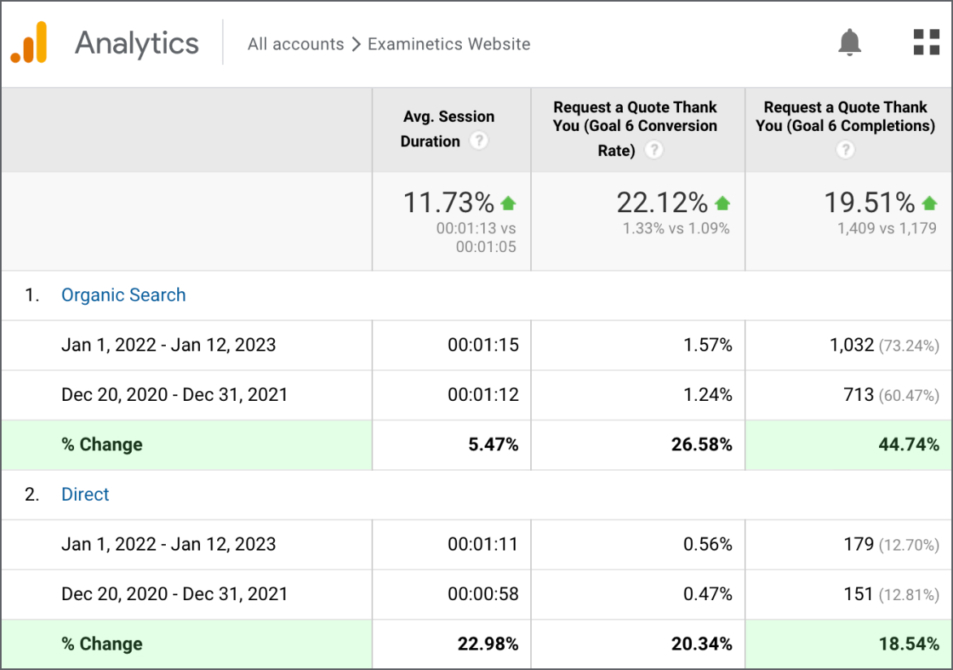
Technical SEO is not a one-time project. Algorithms change, your site evolves, and new issues emerge. I schedule a monthly audit that includes checking Google Search Console for new errors, running a fresh crawl with Screaming Frog, and reviewing PageSpeed Insights scores. I also look at Google Analytics for any sudden drops in organic traffic, which often signal a technical problem like a misconfigured redirect or a broken sitemap.
One thing I have learned over the years is that the biggest gains often come from fixing what is already broken rather than adding new features. Cleaning up redirect chains, removing duplicate content, and updating canonical tags can produce faster results than launching a new blog section. The foundation has to be solid before anything else can stand on it.
For anyone serious about organic growth, investing time in technical SEO is not optional. It is the groundwork that makes every other effort pay off. When your site is crawlable, fast, and clearly structured, everything else - content, links, social media - works better. That is why I still start every project with a technical audit and why I keep coming back to the same tools like Screaming Frog, Google Search Console, and PageSpeed Insights. They are not glamorous, but they are where the real wins live.